


Designing Multimodal Chatbot Interactions for Joseph Beuys’ Laborraum at Museum Schloss Moyland
Master Thesis: Design and Interaction
Duration: November - March 2026
Collaboration: Museum Schloss Moyland
Role: Interaction, UX/UI Designer
1st Supervisor: Prof. Dr.-Ing. Ido Iurgel
2nd Supervisor: Prof. Nicolas Markwald
AI conversational system that combines timelines, carousels and layered info cards to guide visitors through a dense Museum Archive - Lab.
About Project
Problem
A museum room holds 27 archival objects, each carrying several layers of meaning. Chat alone can't carry that much structure, visitors need to see timelines, compare viewpoints and browse objects, not just read replies.

Goal
Design a chatbot that goes beyond text: pairing conversation with purpose-built visual components, so a dense archive stays approachable without losing its depth.
Exploration of Joseph Beuys' Laborraoum at Museum Schloss Moyland Archive


Two ways to explore
The same multimodal toolkit is offered through two entry points, so every visitor finds their own way in.
01 — OPEN
Open Blackboard Chat
Free-form chat with no fixed path — visitors ask anything, and the same visual components surface adaptively in response.
02 — GUIDED
Object Based Chat
The visitor picks one object; the chatbot walks them through it, surfacing components in flexible layers they can skip, reorder or explore deeper.

Core interaction components
Six reusable components carry the conversation beyond plain text, each one solving a different kind of information problem.

History & Biography Layers
Twin scrubbable timelines, hover for a summary, click for a longer read — letting visitors self-pace through decades of context.

Reading Mode
A book-style overlay for longer text, reachable straight from the timeline, for visitors who want to read rather than chat.

Experts Layer
A swipeable carousel of opinion cards, surfacing different scholarly viewpoints side by side instead of a single verdict.
Statement & Artwork Card
Pairs a primary-source quote with its related artwork, visually set apart from the chatbot's own voice.

Pinned Object Dialog
Keeps the selected object visible throughout the exchange, anchoring the conversation to something concrete.


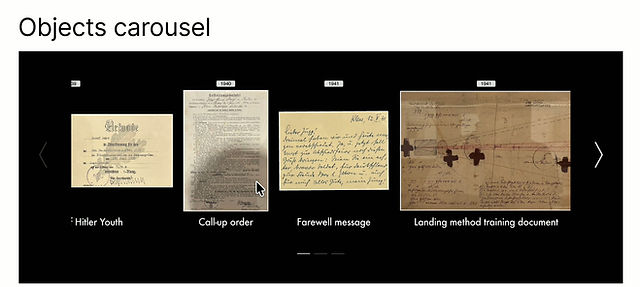
Object Carousel
Lets the chatbot visually reference multiple archive items mid-conversation, without breaking the flow of free chat.
1- Object Based Chat
Choosing an object
Objects are laid out chronologically, mirroring the room's own physical layout. One selection starts one focused, multi-component conversation.


Inside the dialog
Once an object is chosen, it stays pinned on screen while the conversation unfolds beside it, with layer buttons surfacing the History and Biography components on demand.
2 - Open Blackboard Chat

Free exploration
In Open Blackboard Chat, the Object Carousel and Statement & Artwork components reappear on demand — keeping both modes visually and structurally consistent.
Outcome
A multimodal conversational system with six reusable components across two chat modes turns a dense archive into a guided yet flexible experience.